After completing my research about the topic of map projections/ how they relate to Greenland and finished writing the text, I was eager to get started on trying out different video edits.
I gathered a lot of inspiration on social media and used multiple reels as somewhat of a tutorial/template for my own videos.
I will admit, I was probably too quick in jumping on to the production train, as my shotlist was not fully worked out and I had not yet determined the timing/duration of each shot. Still, I tried out a setup at home, because this is also something I aim to achieve – have setups that don’t require a well-equipped studio setting. I do own a Sony A7 IV, which I also used for recording, my light setup is much more rudimentary, as I am using a ring light, a budget LED-floodlight for lighting up the room as well as a budget LED-colored light for establishing moods and create a look.
By now, I have recorded multiple clips and am in the process of editing them using different tools/effects but they still have to undergo massive timing adjustments in order to produce a good result.
Techniques I tried out were for example using background remover tools for layering videos and putting in text, or achieving a kind of stop-motion look for a text animation.
Screenshots from my current progress can be found below.
I am currently busy with trying out ways to record and edit content about science-related arctic topics, focusing on coming up with content and editing ideas I then can apply.
I have made a list of suitable topics and am currently working on the first reel which is all about the size of Greenland and the related topic of map projections.
My learnings so far are quite extensive and mostly related to my workflow and my personal approach, because I realized that a lot of time has probably been lost because I was (or am still) partially unclear about which edits I want to use on which sequence and how to actually produce my visual assets. I will finish this current edit now with how I already started but am aiming to have a clearer plan set up for the next videos. That includes a much more detailed shotlist and thought-out transitions as well as having exact timing frames (as especially for social media, timing is extremely important)
In more detail – the first approach to creating my video was rather messy, as I was mostly drawing on edits/videos I had previously researched and saved, matching those visual ideas loosely to the text/explanations I developed.
I tried to create somewhat of a shotlist to accommodate each sentence/explanation but while doing so I realized that the amount of information and text might just be way too extensive for the intended purpose of the video.
Ultimately, I ended up recording a couple of sequences so I could try out some of the editing styles I found interesting and am currently in the process of editing those clips, matching them with text and hopefully generating a cohesive final result.
I am also still figuring out which kind of text/voiceover would be most suitable for my videos and I might possibly just end up with two versions – one with voicelines that rhyme and have a more rhythmic, fun approach and one with a more „natural“ voiceover / text animation, to test out how they are perceived by viewers and which has the better overall information factor.
Current (faulty) Pre-production process for Video 1
Choosing topic – Greenland and map projections
Researching information about map projections and the special case of Greenland in that context
Researching video edits I would like to try out.
Coming up with the text / voiceover (which, as we now know, is probably way too long/would require many shots)
Creating (somewhat of) a shotlist
This would be the lyric draft I created and used to base my shots on:
For the shotlist, I used a Notion template and essentially based my shots on the respective matching text. I have to admit, however, while writing this list, as mentioned above, I felt that I didn’t have enough clarity as to how I would actually do/produce/set up each shot and how long each sequence would have to be. So, coming back from this first attempt, I aim to make this list more of a priority in order to have a much clearer plan for the recording and editing process.
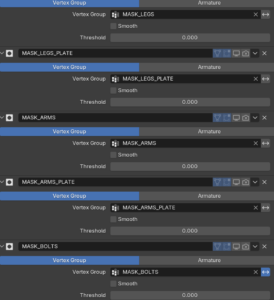
Back again with my rigging process. As already mentioned, the next project is the spider ball. The spider ball is a little robot. It is a ball that can extend its legs, head and guns. Since the model itself is quite complex the teacher provided it divided into different parts as Masks in the Modifier tab. I have never used it before, and it proofed very helpful. With it the different sections of the robot can be easily isolated.
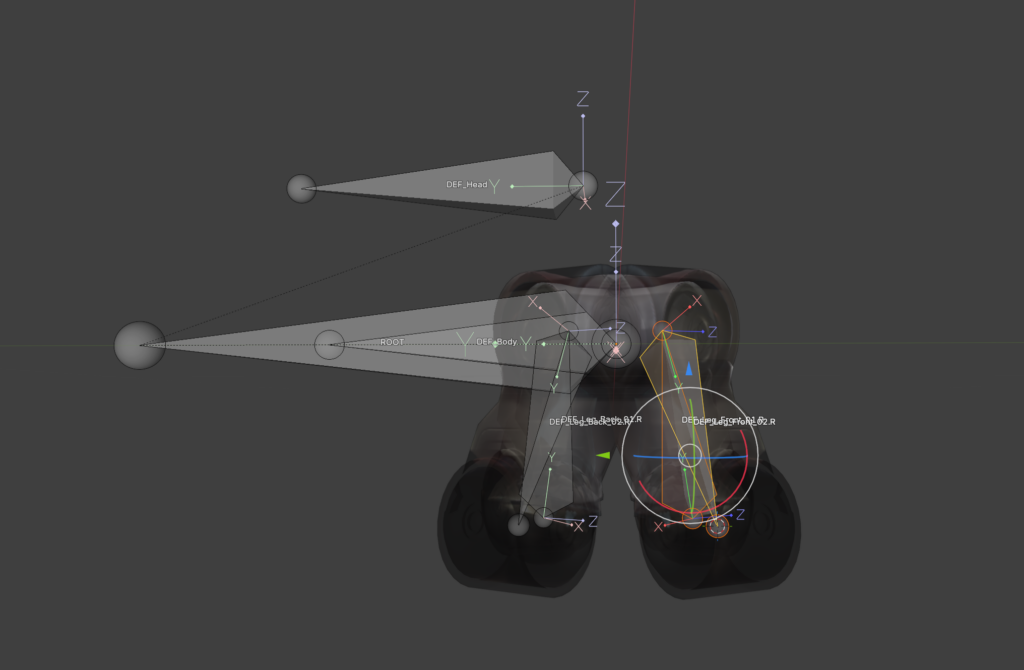
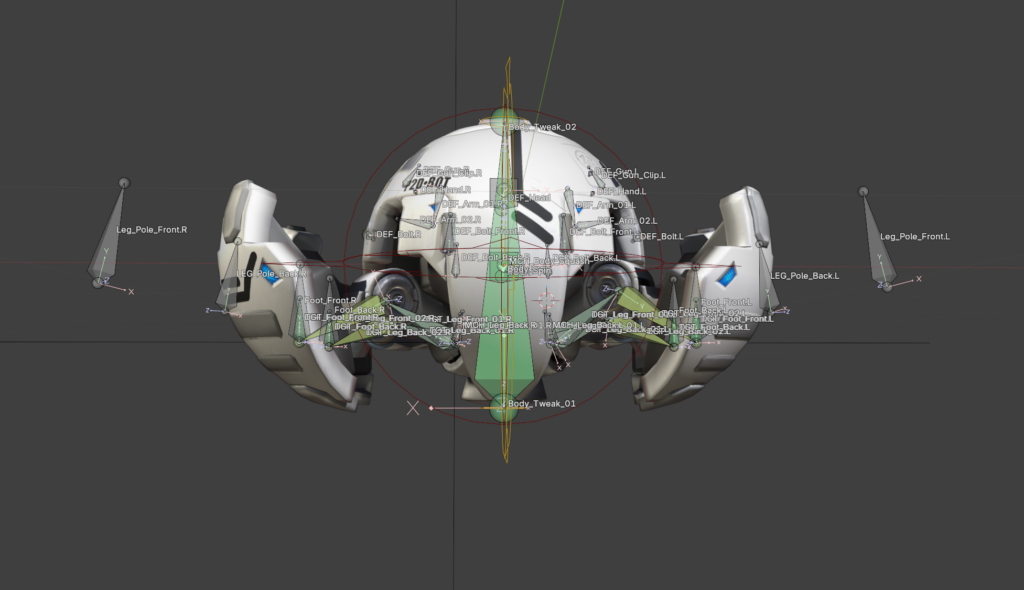
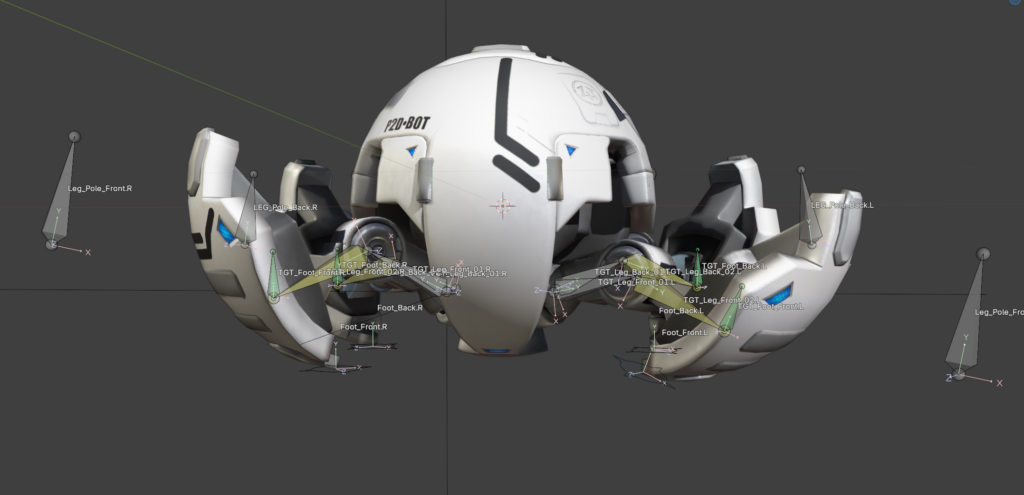
As usual at first every deformation bone needed was created. Then the process of the basic ball rig repeated. Root, Rotation, Body and squash and stretch work pretty much the same.
I really appreciated using my 3D cursor to snap bones onto vertices. I can slowly see the appeal of it. I still don’t like it that I use it accidently all the time. I will get used to it.
The skinning was quick; due to the mechanical function there is no need for soft edges. The skinning was done with empty groups. The parts were selected and assigned in the vertex groups. The explanation that every weight is listed on the right side in the transfom window was helpful. In case something is assigned into multiple groups they can be kicked with one klick.
One thing I found myself thinking about again and again is how much I have learned in this rigging course about modelling. There is so much thought about how something will later work in the rig and animation in the model itself. Of course this is also a byproduct of it being a robot. Every function needs to be thought about in the design process. Behind the parts which open needs to be a fleshed-out design and not just an empty hole. I have never modelled a robot myself, but I feel better prepared to do so from now on. It is fun to work with a model that itself doesn’t have mistakes in it and is properly prepared for the rigging process. It makes the work a lot easier.
The longest part so far of the tutorial is the IK-leg rig. Number one rule for all bones is that you don’t use the deformation bones in the final rig. Just in case something goes wrong in the process it is easier to go back. Therefore, in the first step the leg bones were duplicated and as usual put into a separate Bone collection. All the deformation bones get the copy transformation constraint, and they follow our copied bones. Then the IK Constraint is used. To keep the leg in the correct angle a Pole bone was added. To get it correct it is important to switch to Normals instead of Global in the Viewport and move the bone via the X Aches. To keep the knee from popping IK-stretch can be used with a very small value. Since a robot is not stretchy a new bone was added at the beginning of the leg bone chain. With a limit distance from this bone to the foot the stretching can be negated. To get the correct length the length of the two leg bones needs to be added together. Just copy them and paste them with a plus in the blender tab console. Tada! Blender has a little calculator too.
As a last step everything got its custom shape and color. To conclude, I worked through 13 out of 26 lessons. Another 13 and the ball is finished.
Do you know how to use chopsticks? If so, how did you learn? If you’ve ever tried to teach anybody, how did that go?
Now, imagine those chopsticks are actually 6 m tall pieces of fabric and the student is airborne and spinning. Hard, right?
I’m talking about the same problem as the chopsticks, but in a bigger scale. It’s proprioception, spatial awareness, and observational learning in hybrid scenarios with your life on the line.
For those who don’t know what I’m talking about, aerial silks are pieces of fabric hung from the ceiling and used as an apparatus for aerial dance. While propioception is the awareness of the body.
I’m talking about a design and communication problem. And with 2 years of aerial silks experience, four years in UX research and already eight months of user testing and validation, I can confidently say that there’s no one-size-fits-all solution.
Instead, I propose an aerial silk teaching kit which would support both students who are beginners and advanced in furthering their acrobatic studies by allowing both teachers and students to externalize the internal body process of proprioception.
The kit will be anchored in a 3D model and accompanying app, but will also include supporting elements to tackle each student’s individual challenges like not being able to distinguish left from right.
And just like user research in traditional learning methods in the classroom, I believe this has the potential to revolutionize learning in the gym. Thank you.
I believe everyone knows this situation: you go home to visit your family and within the first five minutes someone says, “I deleted the internet,” “Can you fix my phone,” or “I got this email from the ÖGK again, I don’t understand it.” And before you know it, you’ve spent the next five hours solving technical problems instead of actually spending time with your loved ones.
Many people over the age of 50 today do not have sufficient digital literacy for basic everyday tasks. This includes using common communication tools, identifying misleading information or scams and independently accessing information to form their own opinions about what is happening in the world. As a result, they often depend on others for support and miss the opportunity to fully participate in digital society.
This raises an important question: how can we support this generation in becoming more confident and independent in the digital world?
My idea is a dedicated learning platform that teaches digital literacy to older adults in an accessible and supportive way. Instead of overwhelming users with complex interfaces, it focuses on small, everyday learning steps that are easy to understand and immediately applicable. The platform could combine short guided lessons, interactive exercises and real-life scenarios, such as recognizing scams, using messaging apps or navigating government services online. It also provides on-demand help when users get stuck, so learning becomes part of daily life rather than a separate, intimidating process.
This platform would not only improve individual confidence and independence, but also reduce the constant need for family members to provide technical support. This allows families to shift their time and energy from troubleshooting problems to spending more meaningful time together. Ultimately, the goal is not just to teach technology, but to enable participation, confidence and connection in a digital society.
Imagine you’ve just bought the biggest game of the year. You sit down, you turn it on, and realize you actually can’t read anything that’s on the screen. The text is too small, the colors blend together, and no matter how much you squint, the game keeps on being a blur. For millions of players, this isn’t just a “What if?” scenario, it’s reality. Right now, most game UIs are “one-size fits all”. Designers want to help, but they’re overwhelmed by technical rules or tight deadlines. This results in cluttered UI that’s a hassle for everyone.
My solution is an interactive design toolkit that acts as a digital sandbox for game UI designers. They can drag and drop elements that are already optimized for accessibility. And it’s not just sight, it also provides a framework for haptics and audio cues. What makes it special is that it turns accessibility from a complex chore into a standard with a creative workflow. It makes games more inclusive, but also really helps designers.
I’m doing this is because games have personally improved my quality of life immensely and I’m very passionate about them and about UI design. I want to make sure that people all around the world, regardless of their physical abilities, can have the opportunity to enjoy games as much as I do and be immersed in these worlds as much as I am.
Last time we discussed what structure an ecosystem on Europa could have, today it’s time to explore it. I’ve grouped the animals into their place in the food chain. This way I can build it up gradually, thinking about the way animals would need to evolve to be able to consume their prey or flee from becoming prey themselves.
I put my focus on arthropods, molluscs, cnidaria, annelids and cephalopods – no bony fish, as they seem to be far and in-between and soft tissue animals or those with a shell or exoskeleton dominate around the hydrothermal vents.
I also structured my ecosystem along the aquatic food web. Here, the base is made up of producers, in this case these would be the chemosynthetic bacteria. These are eaten by the primary consumers, who are eaten by the secondary consumers, who are eaten by the tertiary consumers or final consumers. finally, everything that’s left over is broken down by the decomposers.
Producers
Chemoplankton form the basis for life down around the hydrothermal vents of Europa. Through the biological conversion of the minerals and chemicals contained in the vents they produce energy and synthesize organic matter.
Primary Consumers
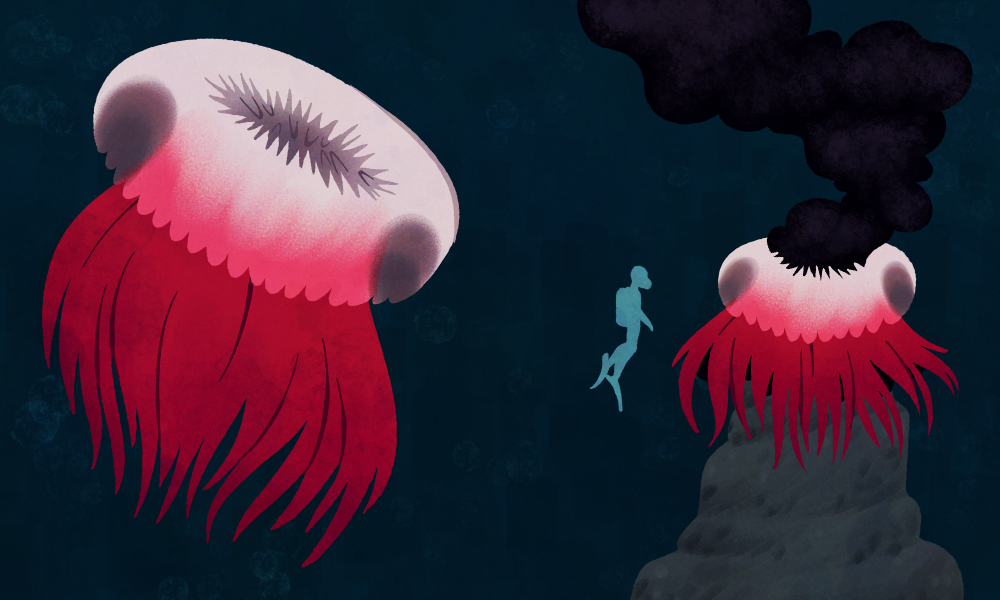
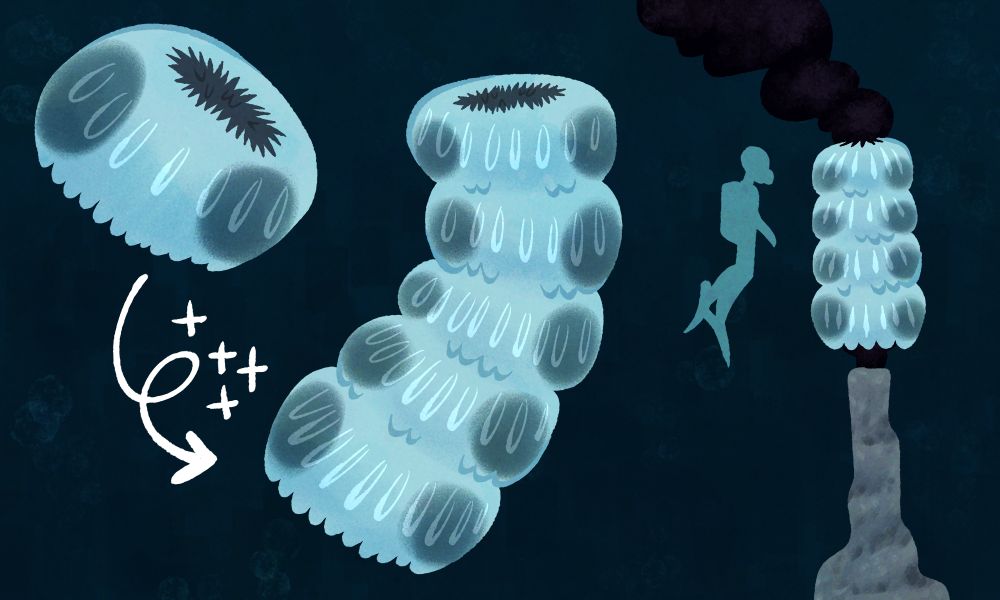
Floaters make up the subphylum of Vitrummarinum a group of animals comparable to jellyfish on Earth. They can be found in the waters right above the vents, drifting in and out of the plumes of smoke being expelled. They possess almost no sensory organs, neither do they have a brain – only a rudimentary sensory system that allows them to detect light, temperature and vibrations in the water. The opening in the centre of their body is filled with soft bristled that they use for filter feeding, which is usually done by “sitting” atop active vents.
Two species of them dominate in the oceans of Europa:
Red Cloaks(Anulusnatans palliumrubrum), which stand out with their diameter of around two meters. They have developed a sort of funnel made from tissue, allowing them to feed from the large vents in volcanically active areas.
Glass Towers(Anulusnatans turrisvitrea) live in shallower oceans and grow only to a diameter of around 40cm. While they lack the funnel structure of their deep-sea cousins, they found a different way to maximize food intake: they “fuse” together with other members of their species, building large, tower-like structures that allow them to feed thoroughly and deter predators due to their unwieldy size.
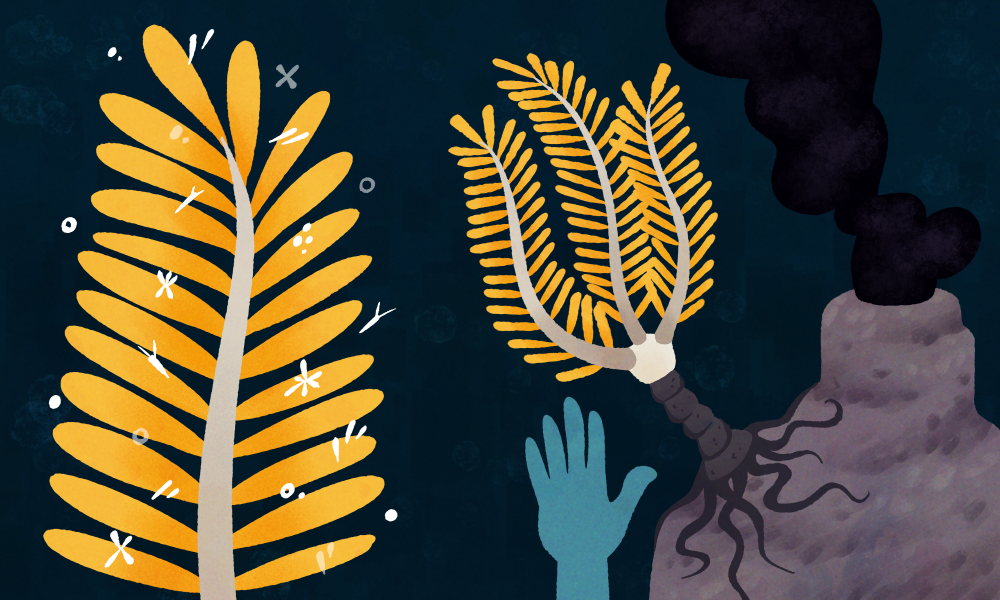
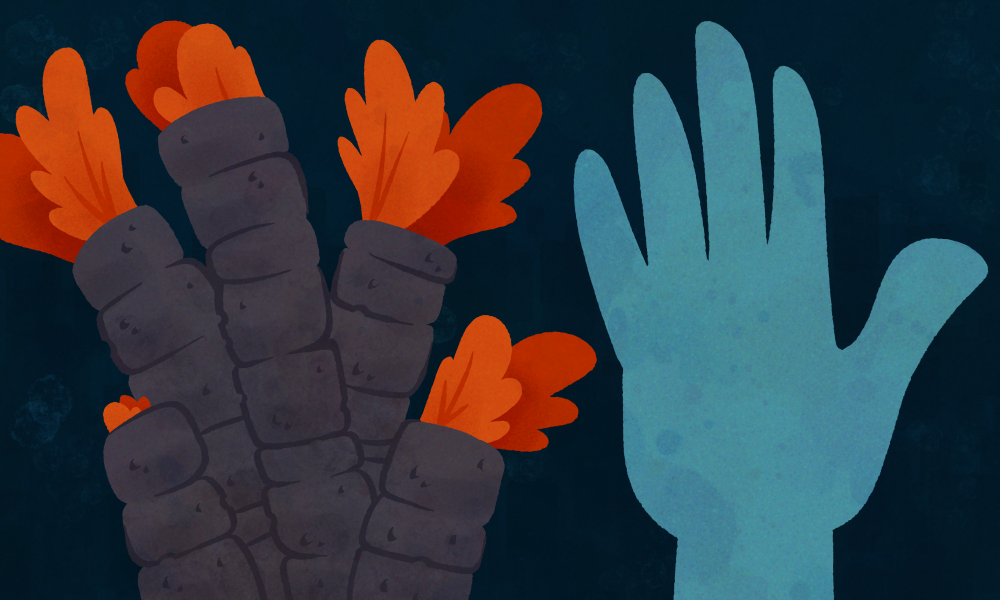
Although Antennae Trees may look like plants, they actually are part of the phylum Caulispennatus. They settle around the vents in both shallow and deep waters, where they dig into cracks and openings in the rock and remain sedentary. Antennae Trees are passive suspension feeders, using their feathered arms to filter Chemoplankton out of the water. Their stems are platted, likely an adaption to process their mineral-heavy diet and protect themselves from predators. They are able to swim by swinging their bodies back and forth, allowing them to move to different feeding grounds and evade predators.
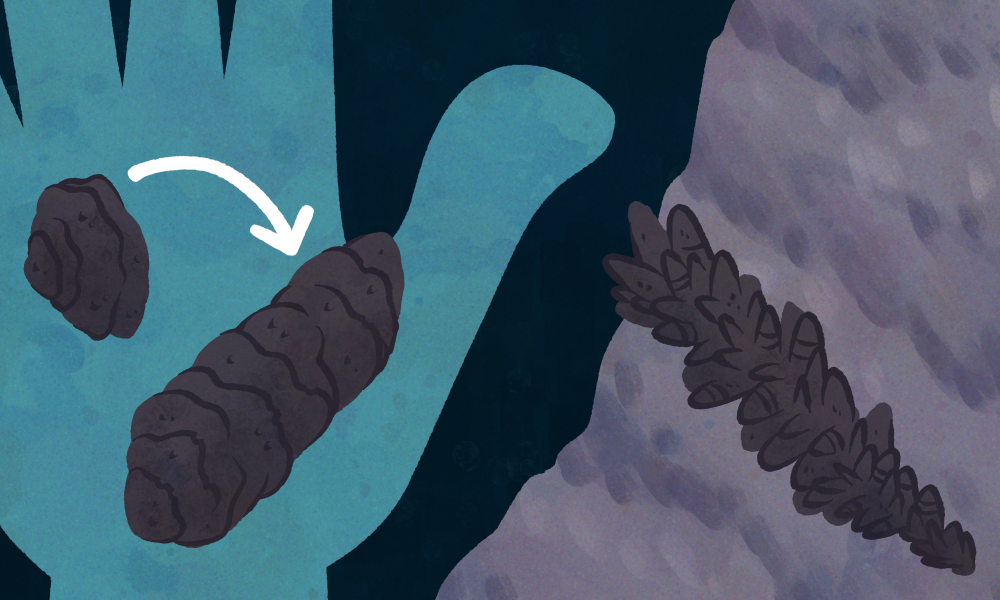
Pipe Worms are part of the same phylum as Antennae Trees, though they separated from their common ancestor around 400 million years ago. Their colonies can be found mostly around the equator, where the tides are strongest and thus the ocean the warmest. They expand often hundreds of square meters across the ocean floor. Their black pipe-like shells are composed from iron sulphides, that are excreted as they filter the black vent smoke for Chemoplankton. These shells protect them from a wide range of predators, allowing them to hide away whenever they sense unusual vibrations in the water.
Iron Beaks belong to the Laminaferrea phylum, a group of mollusc-like animals. Their name is due to the long, beak shape they grow into; young Iron Beaks are visually comparable to oysters but overtime they rather grow in length than overall size. This allows them to safely filter food from inside they rocky crevices they reside in. They commonly live in the shallow zone, though there are species that adapted to life all the way down in the abyss. They are composed of two hinged halves protecting their soft inner body. The black colour of their shell is due to the iron sulphides in their diet.
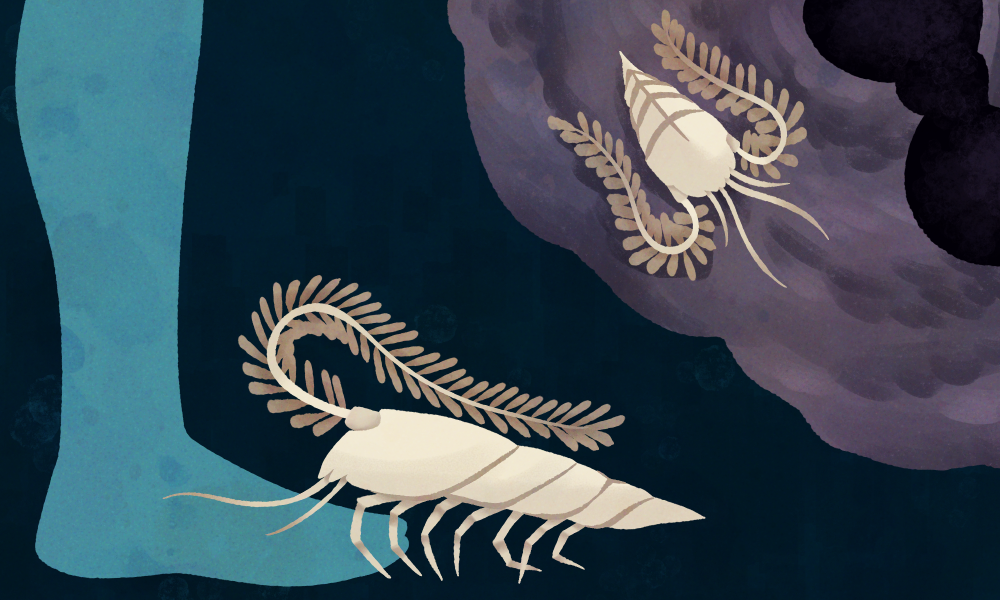
TheWhite Bristle Crab lies in the Armaturatus phylum, which is a group of animals defined through the segmented shell protecting their bodies, similar to a knight’s armor. The White Bristle Crab is one of the most common representatives of the Reptator order, who are exclusively ground-dwelling. They live directly on the vents, roving around in large groups. Their long-bristled antennae are home to bacteria, which go through a process called chemosynthesis that detoxifies the poisonous minerals from the water and turn them into organic matter (–> see Chemoplankton). By “cleaning” their antennae the White BristleCrabs are able to harvest this organic matter. They lack any kind of image-forming organ, though they are extremely sensitive to vibration.
Since last semester I realized that different tools work better for different levels of aerialists, I decided to also test out the 3 prototypes with 3 different participants (henceforth referred to as P1, P2 and P3) who were complete beginners in aerial, with no experience in the field. The following are the findings of the research through design process.
Hanger silk
When explaining the basic French climb with the hanger silk, a problem arose in the fact that the explainer would need both hands to simulate the movement of the feet, but the hanger would still need to be held up. Plus, it was no more useful for P1, P2 and P3 than just explaining the French climb on the actual aerial silk, with hands instead of feet (in order to avoid the physical burnout and need for strength). P3 even mentioned that the hanger silk is not needed, since if you have the silk in front of you, you can also explain it there. Thus, I decided to remove the hanger silk from the final prototype kit.
Neon sleeves
Contrary to the advanced learners and to what was expected, P1 preferred the use of the neon sleeves when she put them on the opposite side of the side the explainer had them on. When asked about this, P1 mentioned that it helped her to pretend that she was seeing in a mirror rather than trying to copy another person. Instead of seeing this as a challenge, I choose to see it as an opportunity of the product itself – with no rules and no restrictions, people can use it however will be more useful to them. When P3 put on the sleeve, after a bit of time I noticed that she didn’t have it on anymore. When asked, she said that she took it off because she was hot. Additionally, since she doesn’t have any problem distinguishing left and right, she said that the neon sleeves didn’t really have an effect on her learning. This furthers the conclusion that the sleeves are useful only in specific cases, and should be included in the final prototype kit, even if they’re not the main focus.
Little guy
This prototype was extremely useful for P1, who said “the little guy gives me confidence that I’m not going to die, because I see that he is not falling so it means I will not fall”. For P2, since she had less upper body strength than P1, the little guy was not really useful; however, she expressed interest in being able to keep using it during her aerial silks journey as a helpful tool. In the case of P3, she said the little guy was her favorite prototype, as it really helped her to understand the difference that body position makes. However, even though she theoretically understood the importance of folding your body to do the hip-key, she still wasn’t able to perform the hip-key in the first attempts, since she wasn’t folded enough. When asked about this, P3 said that she “didn’t think it was necessary to be that extreme”. This furthers the conclusion (from the user testing with advanced students) that one of the most important elements of the little guy is the ability to let students touch and explore through him. In P3’s case, it would’ve been useful to understand the breakpoint from which you go from falling out of the hip key to being locked in place. However, despite this slight hiccup, P3 was able to successfully complete 3 new figures, stay hands-off on the hip-key, AND learn how to climb, which is an impressive feat and not at all expected for beginners, indicating that the use of the prototypes helped accelerated her learning.
Diese Blogpostreihe befasst sich mit One-Shot-Produktionen und Sport-Dokumentationen. Im Rahmen deren wird nun ein Werkstück erstellt, das beide Bereiche miteinander kombiniert: eine One-Shot-Sport-Dokumentation. Diese soll ungefähr fünf Minuten lang sein und in einem Shot aufgenommen werden, während sie gleichzeitig den Sport näherbringen soll. Der Sport, um den es geht, ist Motorsport. Genauer gesagt geht es um die Rennserie Porsche Sixt Carrera Cup Deutschland und es wird dabei ein Fahrer eines deutschen Teams (Proton Huber Racing) begleitet. Das Ganze wird am Wochenende des 24. bis 26. Aprils am Red Bull Ring in Spielberg im Zuge des DTM-Rennens gefilmt.
Warum sich Motorsport gut für eine One-Shot-Sport-Dokumentation eignet
Im Motorsport gibt es selbst viele One-Shots durch die Onboard-Aufnahmen. In fast jedem Auto sind mehrere Kameras angebracht, die für das gesamte Rennen genau dort bleiben und (im Idealfall) nicht bewegt werden. Auch wenn hier aus anderen Gründen mit One-Shot-Aufnahmen gearbeitet wird – nämlich, weil es schlichtweg nicht anders möglich ist, das Cockpit anders zu zeigen bzw. filmen – haben diese für das Publikum eine große Bedeutung. Dies ist im Rahmen dieses Werkstücks allerdings so nicht möglich, da ein Rennen – oder auch ein Training oder Qualifying – viel länger dauert als es der zeitliche Rahmen zulässt.
Die Idee
Onboard-Aufnahmen sind zwar ein sehr bedeutender Teil von Motorsport-Dokumentationen und auch für das Publikum, um ihnen eine gewisse Art der Immersion zu ermöglichen. Allerdings sind diese Aufnahmen vor allem für das Renngeschehen wichtig. Die Idee dieses Werkstücks besteht allerdings darin, dass die Momente, bevor der Fahrer (in diesem Fall wird es ein männlicher Fahrer sein) ins Auto steigt, gezeigt werden sollen. Was geht ihm dabei durch den Kopf? Wie bewusst ist er sich, dass theoretisch Schlimmes passieren kann. Erst am 18.04.2026 kam es beim ersten Rennen der ADAC 24-Stunden-Nürburgring-Qualifiers zu einem tödlichen Unfall. Sieben Fahrzeuge kollidierten miteinander, wobei einer der Fahrer seinen Verletzungen im Medical Center erlag. Ende März kam es in einer Porsche-Carrera-Cup Serie ebenfalls zu einem schweren Unfall, in dem sich ein Auto mehrmals überschlug und schließlich in einem Fangzaun kopfüber hängen blieb. Auch wenn dem Fahrer nichts passiert ist, und die Rennautos sich über die letzten Jahre sicherheitstechnisch sehr stark weiterentwickelt haben, ist Motorsport ein gefährliches Unterfangen. Es ist sowohl physisch als auch psychisch anstrengend. Wie geht der Fahrer damit mental um? Was geht ihm in den letzten Minuten – Sekunden – durch den Kopf?
Das Ziel des Werkstücks ist es, diese Momente festzuhalten und in einer einzigen Einstellung aufzunehmen. Gleichzeitig soll ein gewisses Merkmal von Sport-Dokumentationen aufgegriffen werden: die Interviews. Auch wenn diese die Magie der Immersion einer One-Shot-Production etwas wegnehmen, sind sie ein bedeutender Teil von Sport-Dokumentationen. Allerdings soll das Interview – das die Gedanken des Fahrer widerspiegelt und mehr Einblicke geben soll – sich gut in die alltäglichen Geräusche des Paddocks einblenden.
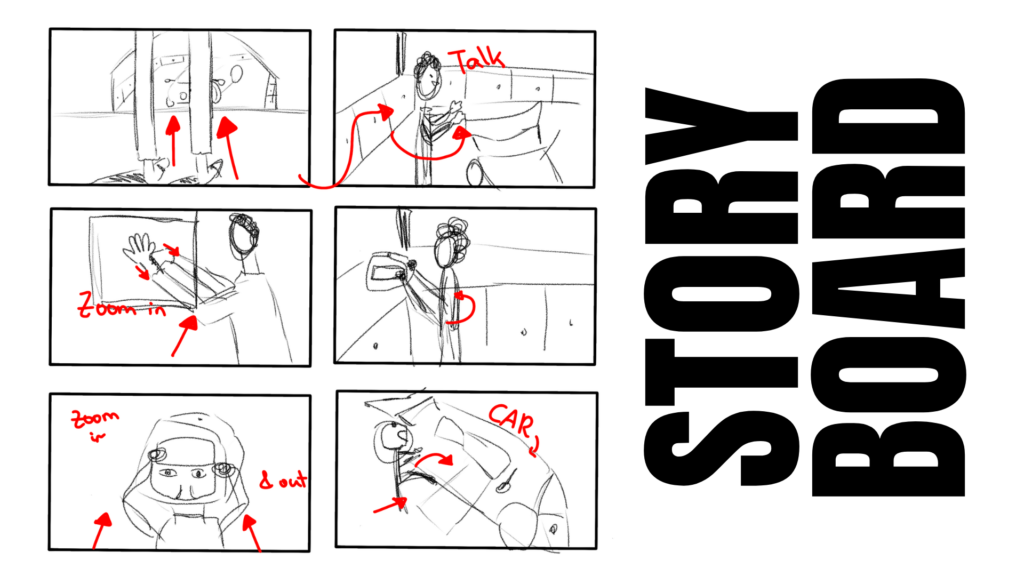
Die Kamera folgt dem Fahrer zuerst in die Box. In Spielberg bzw. beim DTM-Wochenende am Red Bull Ring sind diese durch die vielen verschiedenen Support-Serien und Teilnehmer:innen etwas anders als gewöhnlich. Außer den DTM-Autos, haben alle anderen Teams und Serien Zelte (oder aufgebaute Mobile-Homes) als Pits. Dadurch gibt es allerdings auch etwas weniger Platz – zum Filmen und Arbeiten – was eine Schwierigkeit darstellen könnte. Der Fahrer soll seinen normalen Tätigkeiten nachgehen: mit den Mechaniker:innen reden, mithelfen, sich Race-Ready machen. Die Kamera folgt ihm dabei die ganze Zeit und ist in manchen wichtigen Momenten, wie beispielsweise das Anziehen des Helms, näher am Geschehen. Enden soll das Video damit, dass der Fahrer ins Auto einsteigt und die Türe zugemacht wird – der Moment, in dem das Rennen, Training, Qualifying etc. beginnen würde.
Das Equipment
Für das Werkstück habe ich mich dazu entschieden, meine eigene Kamera zu verwenden (Sony FX30), da ich damit auch in Zukunft arbeiten muss bzw. darf. Außerdem erweist sich die Sony FX30 nicht nur als klein und handlich, sondern sie ist auch vom Gewicht nicht so schwer. Außerdem wird ein Gimbal (DJI RS 4 Pro) als Unterstützung und Versicherung der Qualität hinzugezogen. Als Mikrofone werden ebenfalls welche von DJI (Wireless) verwendet.
Vorbereitung
Zur Vorbereitung wurden die Shots mehrfach geübt, um sich nicht nur mit dem Equipment, sondern auch der Reihenfolge und dem Ablauf bekannt bzw. vertraut zu machen. Bei One-Shot-Productions ist die Vorbereitung das A und O. Trotzdem wird sich eventuell beim Dreh einiges ändern. Das kann an Platz-Gründen und/oder Team-Entscheidungen bzw. -Abläufen liegen. Motorsport hat eine sehr schnelle Arbeitsumgebung (und das nicht nur wegen dem Highspeed der Autos). Alle Abläufe müssen stimmen und Hand in Hand gehen, um Fehler zu vermeiden und Sicherheit und Risiken zu minimieren. Daran muss sich auch während des Drehs angepasst und gehalten werden, weshalb sich gegebenenfalls einige Dinge kurzfristig ändern könnten.
Der Dreh wird am Freitag, 24.04., nachmittags zwischen dem freien Training und dem Renn-Qualifying stattfinden. Als Zeit wurde dafür der gesamte Nachmittag eingeplant.
In class on 23.04., we worked on elevator pitches following a step-by-step guide on how to build a good pitch. This is what I came up with for my project:
Imagine you have a really beautiful dress that you love and use all the time. One day, while you are wearing it, you trip and fall, and the bottom of your dress rips and makes a big hole. You are devastated because now you can’t wear it anymore, and since you got it a long time ago, you can’t buy a new one.
BUT! With the help of my website ReIY, it doesn’t have to be as hopeless as it seems! On the website, you can enter what fabric you have and what problem you are facing, and with the help of a big archive of patterns, hacks, and an AI search engine specialized in redesigning and upcycling, it gives you suggestions and tutorials on ways to salvage your dress. For example, you could hem the dress into a shorter version, or turn it into a top by cutting off the bottom ruined part.
What’s special about the website is that you can use both the specialized AI and a large network of filtered online tools and tutorials to find the best solution to your problem. Whether that’s tips on tailoring your clothes correctly, creating personalized patterns, or fixing a stained top that you now want to dye a new color.
The reason I’m making this website is because I believe reuse and promoting longevity are the most sustainable ways to consume clothing. I am already doing it myself, so I want to show people how easy it is and help them do the same.